Translating Marie no Atelier Ver 1.3

Hello Everyone! I have decided that I want to learn the skills needed to develop translation patches.

I recently bought a Sega Saturn in Japan and have come to learn about the awesome library of games that it is mostly inaccessible to western audiences. Since I am not fluent in Japanese I decided it would be best to start with a game that I know already has an English translation.

The Atelier Marie remake released in 2023 and has an English translated version of Atelier Marie Plus (PSX) in the deluxe version. I plan to base my translation on this release.

I will post my method so that others can use this as instructions to learn, and so it is easier to give feedback.

 

Attachments

  • Title_Sign.png
    Title_Sign.png
    13.8 KB · Views: 0
To start off this project I decided that I should find some of the text, make a change and observe it in game.

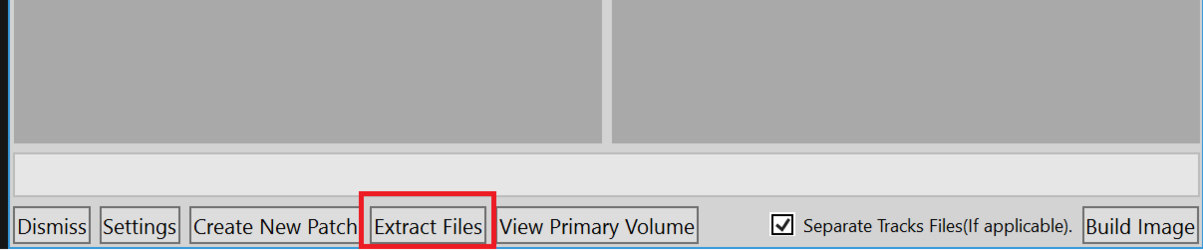
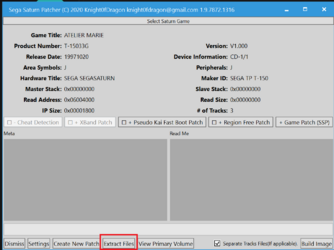
I used SSP to extract the game files from my disc.

SSP_Exctraction.png


After extracting I get a folder with these files:
Game_Files.png


After googling some file types I determined where the important information would be. _Post and _Pre are entirely empty once opened, these are likely used to position the game data on the disc. _TRK would appear to have all of the audio files. 0LOGO.BIN and MARIE.BIN are fairly small so they probably contain boot information, but they could still contain items of interest. MARIE.DAT is a data file and should contain all of the game data we are interested in. Then there are a few thousand ADP files. These files are typically are for animations.

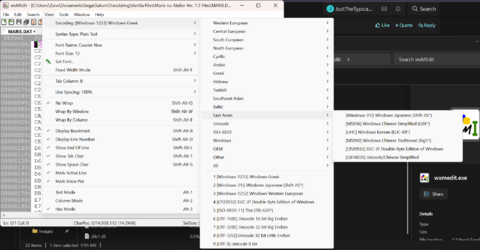
Opening MARIE.DAT in the hex editor is unreadable unless the encoder is set correctly. Luckily this game uses the Shift-JIS encoding. To set this go to: View-> Encoding -> East Asian -> (Shift-JIS*).

Change_Encoding.png


With the encoding set I was able to find some early text in the file:

Text_Found.png


Opening the file is read-only so I save it under as MARIE_test.DAT to be able to write to the file.
I test changing the text with 1 byte and 2 byte characters because all of the text is in 2 byte characters.

Text_Changed.png


I then save the file as MARIE.DAT and open CDmage. I load my original disc into CDmage and double click on Track 1. This should open the files in this track. Find MARIE.DAT and right click the file. Select Import File..., pick the MARIE.DAT file that we edited, and wait for it to load. Click OK and open the disc image in an emulator:

Text_Changed_InGame.png


The 2 byte English characters appear but the 1 byte English characters do not. This means that the font for this game only contains 2 byte characters.

My next post will be on identifying graphics and font tables.

The programs I installed to start looking at the game include:
wxMEdit - A hex editor with Shift-JIS encoding
NJStar - A word processor for Japanese (For notes and character table)
Yabause - emulator with debugger
CDmage - Good for testing file changes quickly
CrystalTile2 - Tile editor to look for graphics in files
SegaSaturnPatcher (SSP) - Extracts files from disk and makes final translation patch
 

Attachments

  • Change_Encoding.png
    Change_Encoding.png
    203.7 KB · Views: 0
  • SSP_Exctraction.png
    SSP_Exctraction.png
    8.8 KB · Views: 0
  • SSP_Exctraction.png
    SSP_Exctraction.png
    46.8 KB · Views: 0
Any file extension beginning with "_" are files created by SSP as a way of including additional data that's not on the main data track. I believe _POST and _PRE are meta data while _TRK is any CD audio tracks present. You do not need to include these files in your patch as they are not in the main data track. CDDA patching can be done with SSP but you would use the designated process for that when creating a patch. Also, file extensions are almost entirely arbitrary and googling will often send you down a wrong path.
 
It is summer time and I've dusted off my Sega Saturn. I have found some motivated to work on this project again. Picking up where I left off here is the font table that was found using crystaltile2. These run from 0x00C96518 to 0x00C9ED7C. It is all 1bpp and nothing is compressed.

font_1.png
font_2.png
font_3.png
font_4.png
font_5.png


I then used a standard Shift-JIS table and manually checked which codes rendered a character. I used CDMage to quickly change a character and see if it rendered in game. A common issue with translating Japanese games from this era is that there are no half width characters in this font table. only full width characters. This is where I left the project last year as I was not sure how to proceed.

The method I needed to proceed was to implement variable width font (VWF). To accomplish this I started out by using Ghidra and the debug tools in Yamause to map out the code pipeline that the character glyphs pass through in the game code. To start this I modified a text glyph to represent a half width rectangle (hex = FF00 FF00 etc.) and then searched for that in the memory once it was loaded on screen. It was located in LWRAM at 002CD200.
Modified_Character_in LWRAM.png


From there I set a (read/byte) memory breakpoint on 002CD200 and the stop happens right before the textbox containing the modified character would load. You can confirm that this is the correct break by double checking that the hex of the character we are looking for is loaded into LWRAM.
Modified_Character_Memory_Breakpoint.png


I am not an expert in assembly code so I used Ghidra to make sense of the disassembly code. To set up Ghidra for this game we need to import MARIE.BIN which is the executable file while MARIE.DAT is the raw data. For the language select HyperH SH-2 Big Endian. Select the Options... and set the base address to 0x06004000 because otherwise the auto-scan will miss the range that contains all of the game code.
Ghidra_Loading_1.png

Ghidra_Loading_2.png

From there let the auto analysis run and you should find many functions. This is where you can use Navigate -> Go to... and copy one of the back trace addresses into the search. Here is the pseudo-code for where the memory breakpoint stopped:
Ghidra_Loading_3.png


Repeating this code/memory breakpoint and function look up can decompile the pipeline that the text follows from being stored on the rom to being rendered on the screen each frame.
With some help from a community member @paul_met, the value of character sprite output pitch has been located at 0602BCF4. This is value that determines how far each character is drawn apart. So reducing this makes all of the characters closer. I also have used my character table to dump all of the game dialog to files for translation.

The current plan is to translate the game by hand (using other translated references). Inject half width characters into the character table. Create a patch code that references a width table to have VWF. Once I have these done I will hopefully post some nice looking game dialog.
 
Excellent write up!

To note, extracting the files with SSP will put them all in "read only" by default ; its why I tend to extract with CDMage instead.
The Saturn likely boots 0LOGO.BIN to play intro logos/movie while the title screen loads in the background just FYI.

This looks like a really cool project.
 
Back
Top